Cruce Saunders
  • Player card
  • Workshop
  • List
  • Contact
Cruce Saunders
  • Player card
  • Workshop
  • List
  • Contact

BrainWave AI and Commit AI

Feb 2026AI agentsOpen source

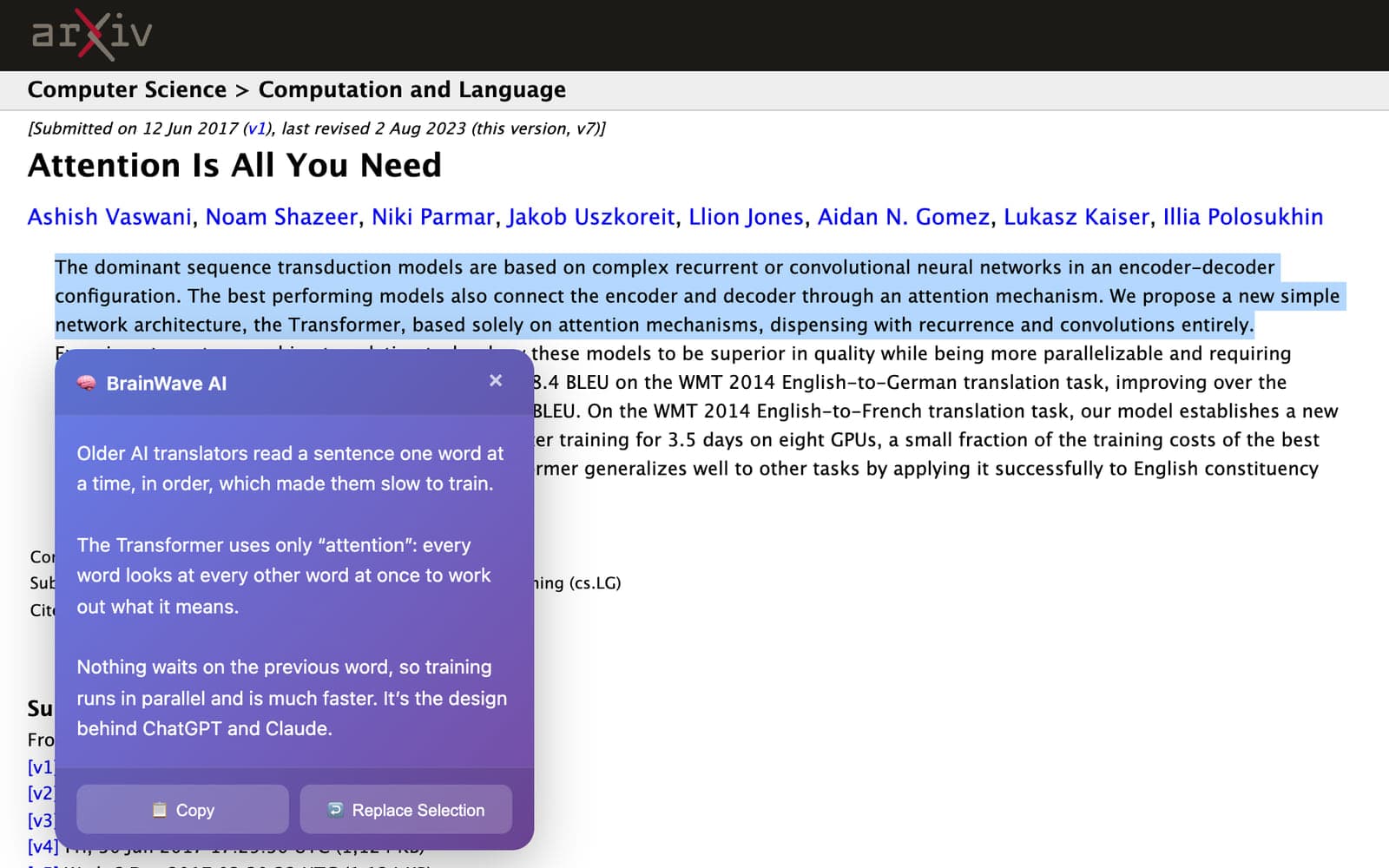
The arXiv page for 'Attention Is All You Need' with the first three sentences of the abstract highlighted and a purple BrainWave AI panel below them explaining the Transformer in plain language, with Copy and Replace Selection buttons.
BrainWave explaining the abstract of the paper that introduced the Transformer.
Back to the worldBrainWave AI and Commit AI
  • Player card
  • Workshop
  • List
  • Contact
  • Back to the world
  • Player card
  • Workshop
  • List
  • Contact

BrainWave AI and Commit AI

BrainWave AI and Commit AI are three extensions that Igris, an AI agent I set up and directed, built and shipped in one day.

BrainWave summarizes, explains, rewrites or translates any text you highlight on the web, in Chrome or Firefox. Commit AI, for the code editor VS Code, reads your code changes and writes the commit message.

I set the goal and checked the work while Igris wrote the code, deployed the backend and download site, and drafted the store listings. It was an early version of how I build with agents now.

extensions: Chrome, Firefox and VS Code
33
from first commit to store-ready listings
11 hours11 hours
production deploys of the backend and site
2020

I set up an AI agent and gave it a brief

In early 2026, months before I built Crew, my own system for running agents, I ran Igris, an AI agent on OpenClaw. OpenClaw is an open-source framework for AI assistants that keep working in the background on your computer. Igris lived on my Mac with a terminal, GitHub and Vercel, the service that hosts websites.

I gave it a brief: build small AI tools that students and developers would actually install, make each one do a few things well, and ship them with a real website. Then I let it work. Between 7 a.m. on February 3 and 3 a.m. the next morning, it pushed three extensions to GitHub, deployed the backend and download site 20 times, and drafted listings for the Chrome Web Store, Firefox Add-ons and the VS Code Marketplace. My part was the goal, the review and the calls it couldn't make alone.

How the work moved

MeWrites the brief,reviews the resultsIgrisAn AI agent on OpenClaw,running on my MacBuildsThree extensions and abackend that callsClaudeShipsGitHub repos, Verceldeploys, store listingsBrainWave AIChrome and FirefoxCommit AIVS CodeDownload siteInstalls, a live demo,FAQ, privacy policyBriefMeWrites the brief, reviews the resultsIgrisAn AI agent on OpenClaw, running on my MacBuildsThree extensions and a backend that callsClaudeShipsGitHub repos, Vercel deploys, storelistingsBrainWave AIChrome and FirefoxCommit AIVS CodeDownload siteInstalls, a live demo, FAQ, privacy policyBrief
PersonAI agentSystemOutput
  • Me: Writes the brief, reviews the results
  • Igris: An AI agent on OpenClaw, running on my Mac
  • Builds: Three extensions and a backend that calls Claude
  • Ships: GitHub repos, Vercel deploys, store listings
  • BrainWave AI: Chrome and Firefox
  • Commit AI: VS Code
  • Download site: Installs, a live demo, FAQ, privacy policy
  • Me to Igris: Brief
  • Igris to Builds
  • Builds to Ships
  • Ships to BrainWave AI
  • Ships to Commit AI
  • Ships to Download site

BrainWave puts AI on any page

BrainWave is a browser extension, a small add-on that runs inside Chrome or Firefox. Highlight text on any website, right-click and choose Summarize, Rewrite, Explain or Translate with BrainWave. A panel opens under the text with the answer from Claude, Anthropic's AI model, and buttons to copy it or swap it in for the original. There's no account to create, and five requests a day are free.

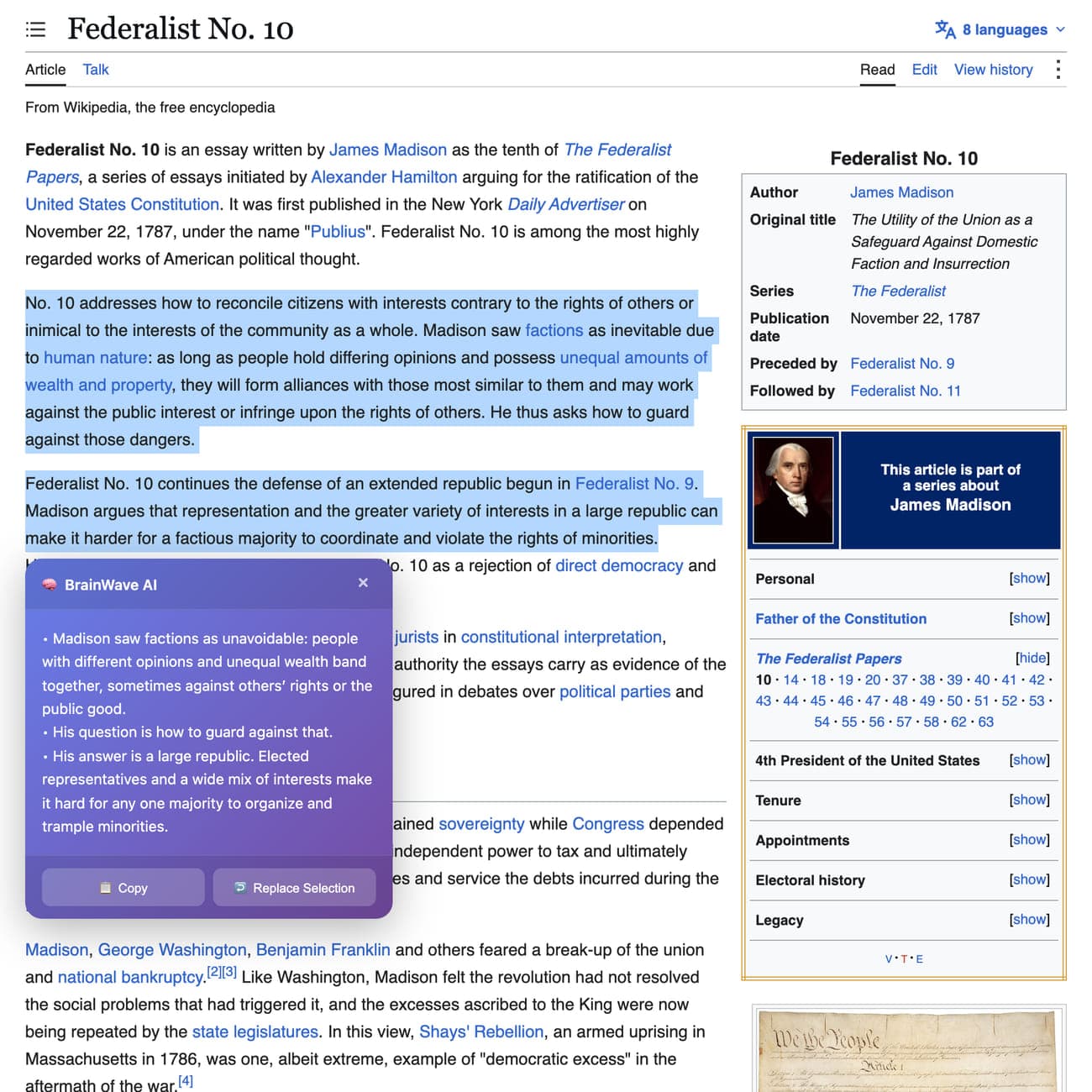
  1. Wikipedia's Federalist No. 10 article with two paragraphs highlighted and the purple BrainWave AI panel below them showing a three-point summary of Madison's argument, beside the infobox with Madison's portrait.
    1

    Step 1: Summarize a dense reading

    Highlight a passage, right-click and choose Summarize. Here it boils two paragraphs on Federalist No. 10, James Madison's essay on factions, down to three points. Cmd+Shift+B summarizes without opening the menu.

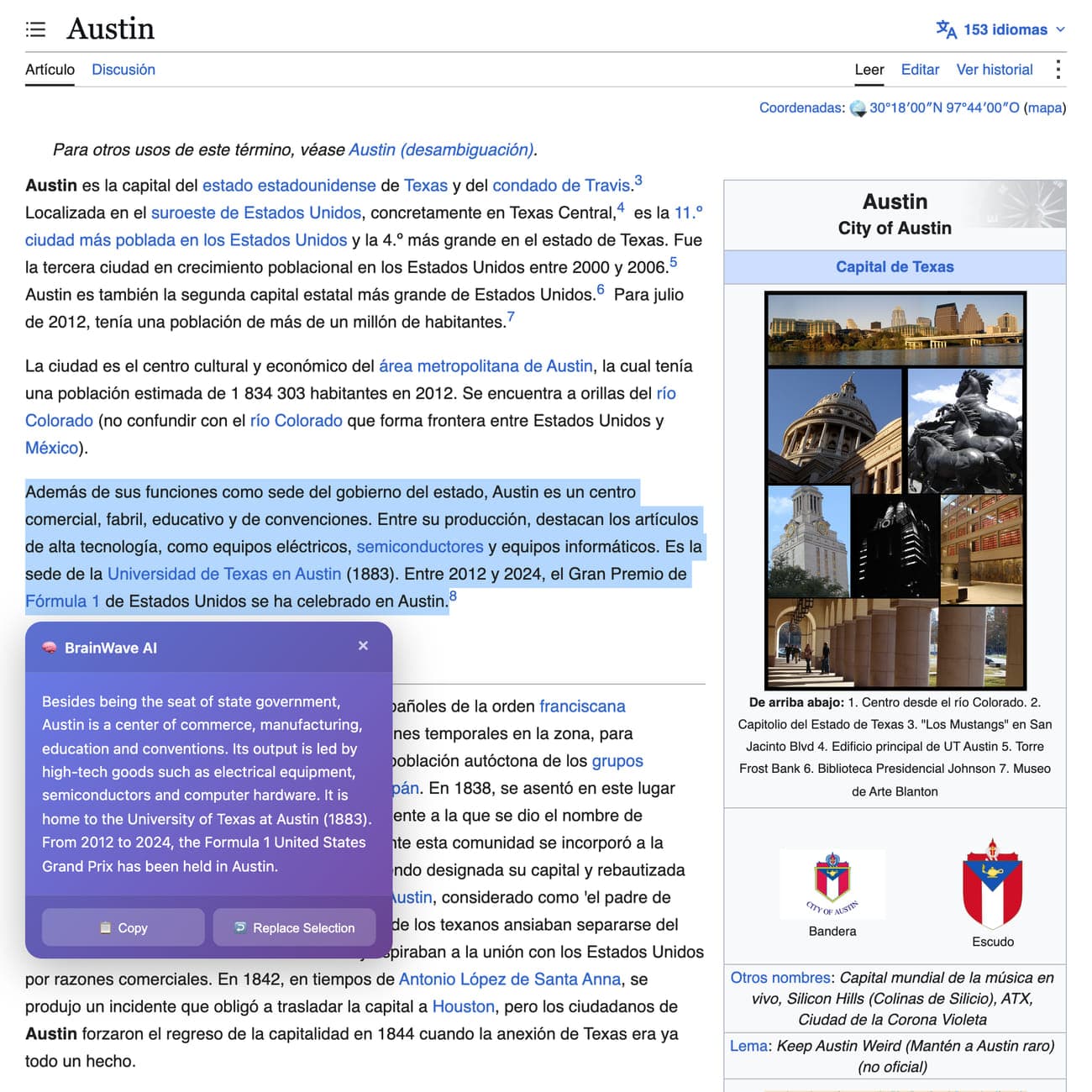
  2. Spanish Wikipedia's Austin article with a paragraph highlighted and the BrainWave panel showing its English translation, beside the article's photo collage of the Austin skyline, the Capitol and the UT Tower.
    2

    Step 2: Translate a page you can't read

    On Spanish Wikipedia's article on Austin, Translate turns a paragraph about the city's tech industry and the University of Texas into English, right where it sits on the page.

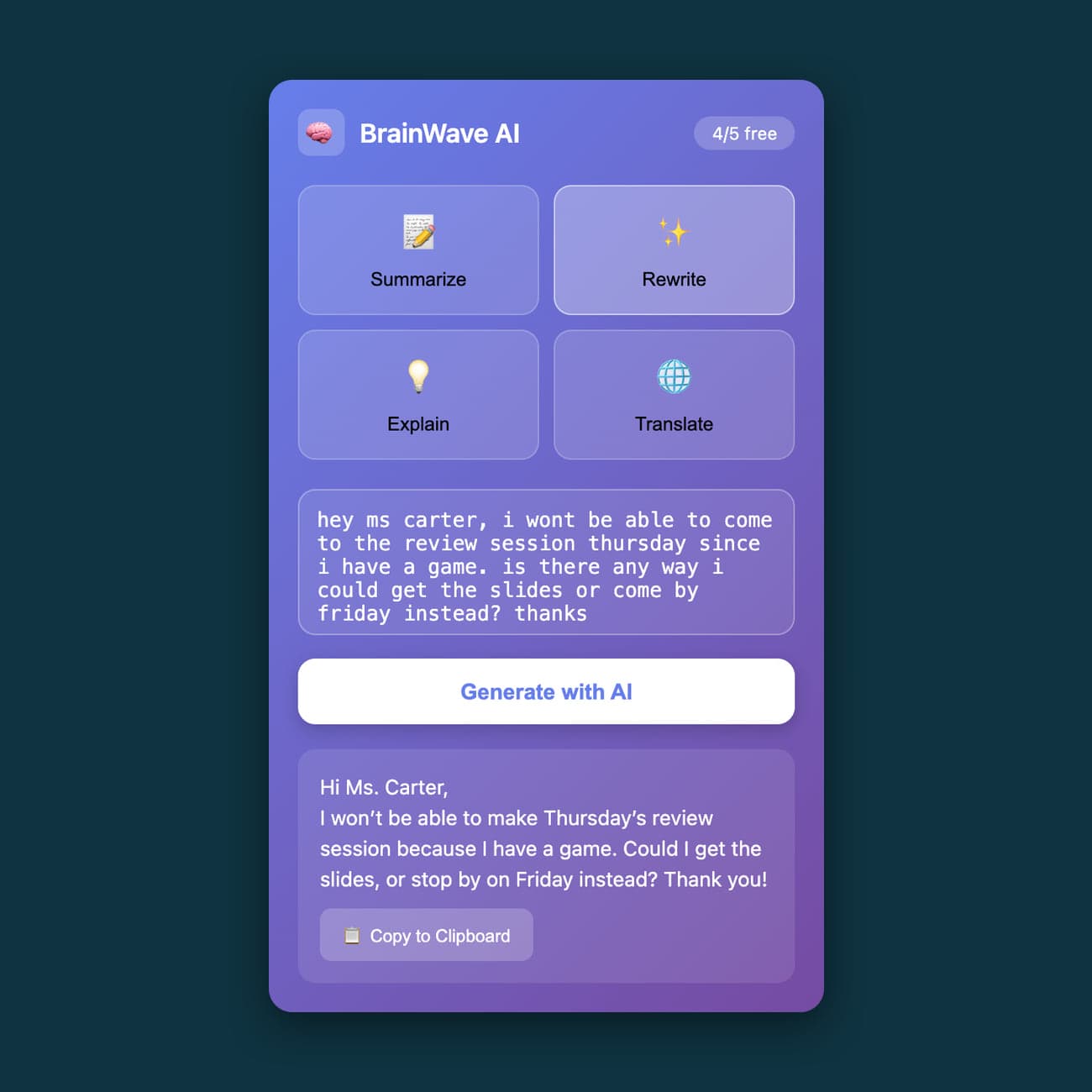
  3. The BrainWave AI popup with Rewrite selected, a rough note to a teacher in the text box, the polished version under a Generate with AI button, and a '4/5 free' counter.
    3

    Step 3: Or paste text into the popup

    Clicking the toolbar icon opens a popup with the same four actions for text you paste in. Here Rewrite turns a rushed note to a teacher into a clean message, and a counter shows how many free requests are left today.

Wikipedia's Federalist No. 10 article with two paragraphs highlighted and the purple BrainWave AI panel below them showing a three-point summary of Madison's argument, beside the infobox with Madison's portrait.
Spanish Wikipedia's Austin article with a paragraph highlighted and the BrainWave panel showing its English translation, beside the article's photo collage of the Austin skyline, the Capitol and the UT Tower.
The BrainWave AI popup with Rewrite selected, a rough note to a teacher in the text box, the polished version under a Generate with AI button, and a '4/5 free' counter.

Commit AI writes the commit message

Programmers save their work in Git as commits, and each commit needs a short message saying what changed and why. Writing them is tedious, so they're often vague. Commit AI adds a sparkle button to VS Code's Source Control panel. Stage your changes, click it, and it reads the diff, the exact lines you added and removed, sends it to Claude and shows the message it wrote.

You choose Use This, Edit or Regenerate, and the message drops into the commit box. It writes in three styles, conventional, simple or detailed, and a setting caps how much of the diff it sends, to keep AI costs down.

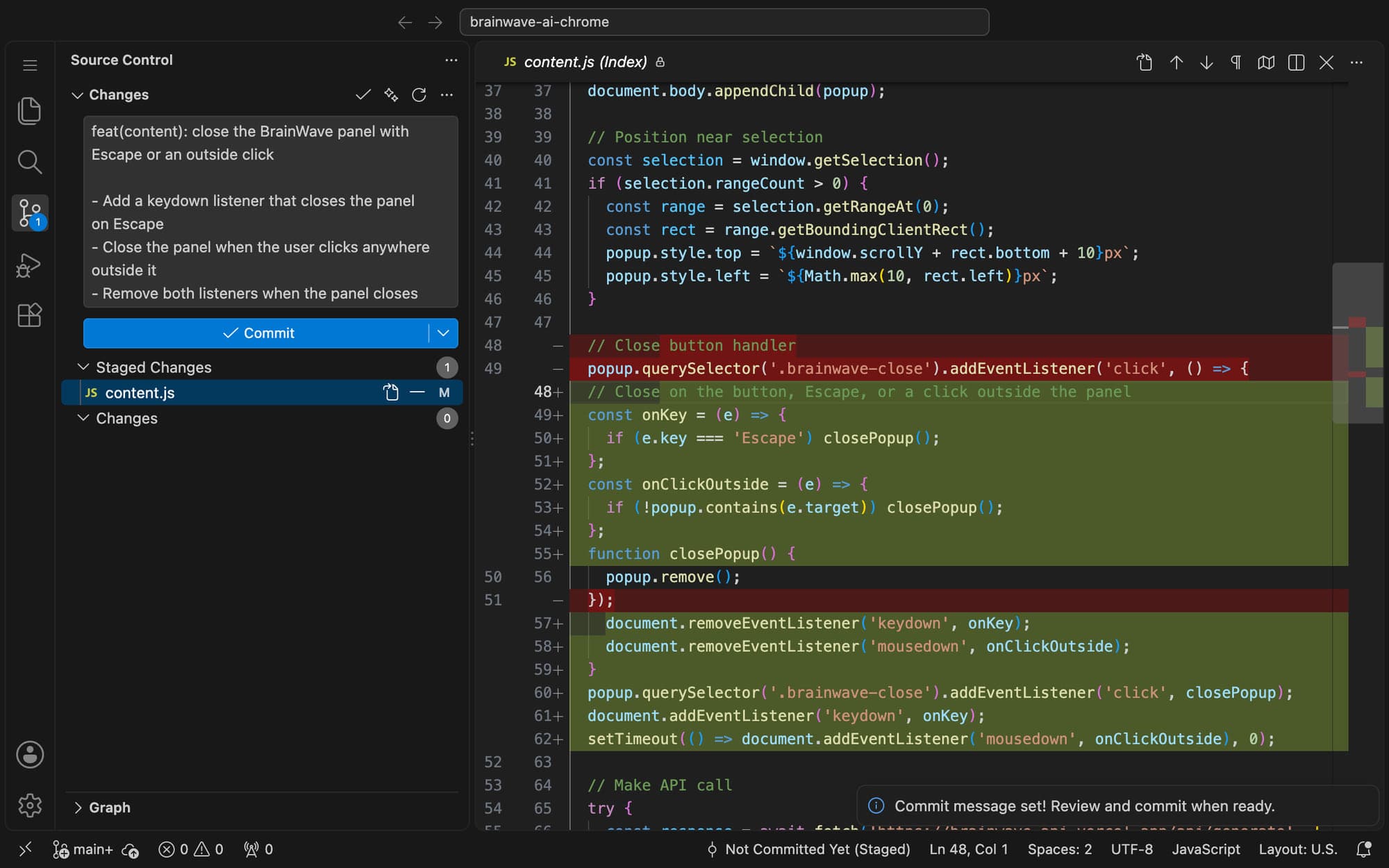
VS Code with the Source Control panel showing a generated commit message, 'feat(content): close the BrainWave panel with Escape or an outside click' with three bullet points, beside the staged diff of content.js and a 'Commit message set!' notification.
Commit AI's message for a change to BrainWave's own code.

It shipped them like products

The code was half the job. Igris also gave BrainWave a backend on Vercel that passes requests to Claude, and a download site with install steps for all three extensions, a live demo you can try without installing anything, an FAQ, a privacy policy and terms. It drafted the store listings with a promo image, and set up each GitHub repo with a changelog, a contributing guide and issue templates.

The download site Igris built and deployed.

1 of 2
The BrainWave AI download site: the tagline 'Simple AI text tools. Just 4 features. Zero bloat.', a Try Demo button, the four actions, and download cards for BrainWave for Firefox, BrainWave for Chrome and Commit AI for VS Code.

The download site Igris built and deployed.

1 of 2

What it taught me about directing agents

Igris could ship a working product in a day, and it did its best work when I was specific. A loose goal got generic features. A clear brief, a short list of what done means and a review at the end got software I'd put my name on.

That's still the core of how I build. Crew, the agent system that built this website, runs on the same three things, with many agents working in parallel instead of one.

Visit the download siteBrainWave for Chrome on GitHubBrainWave for Firefox on GitHubCommit AI on GitHub

More builds

  • AI agentsCrew and JevSep–Oct 2026
  • WebApex SATSep–Oct 2026

Back to the workshop