Cruce Saunders
  • Player card
  • Workshop
  • List
  • Contact
Cruce Saunders
  • Player card
  • Workshop
  • List
  • Contact

School Game

Oct 2026GameIn progress

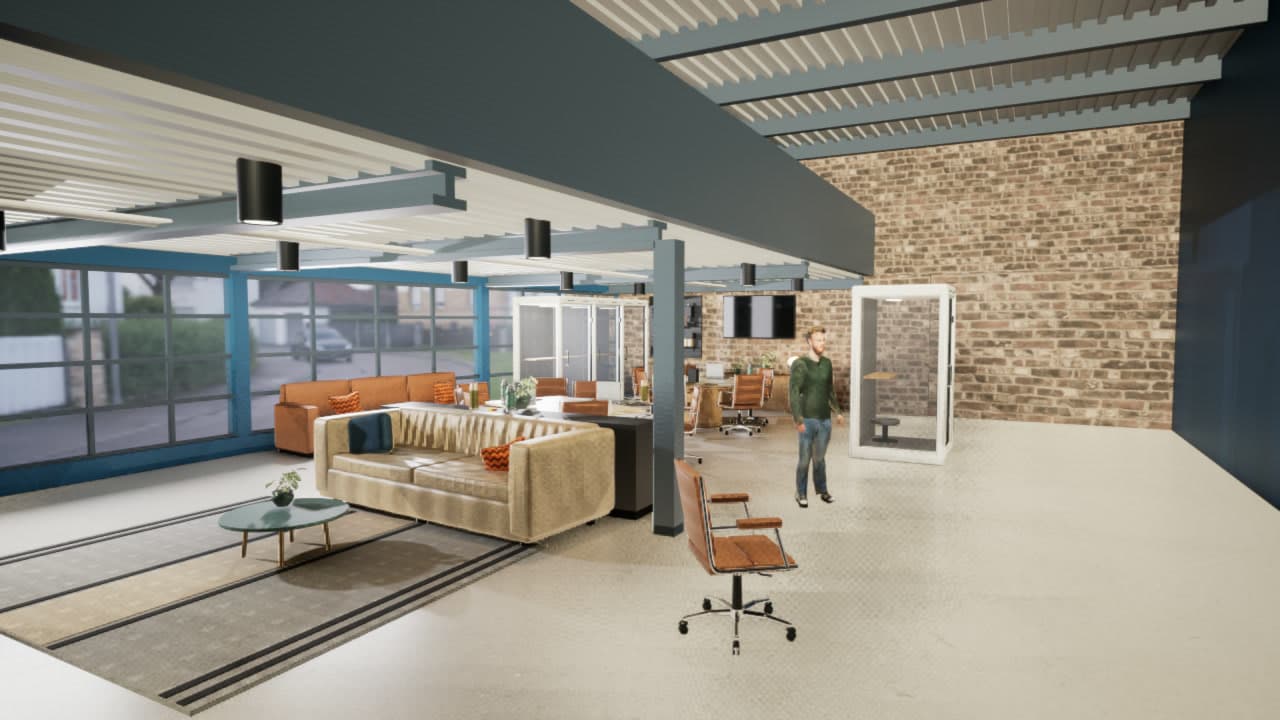
Unreal Engine render of the school's downstairs: a tan leather sofa and orange chairs under a slatted ceiling, glass phone booths, a brick wall, garage-door windows and a 3D character walking through.
Back to the worldSchool Game
  • Player card
  • Workshop
  • List
  • Contact
  • Back to the world
  • Player card
  • Workshop
  • List
  • Contact

School Game

School Game is a first-person replica of my school, Alpha, that you can walk through in a browser, rebuilt from two iPhone LiDAR scans.

AI agents traced a floor plan from the scans, rebuilt the walls, stairs and furniture as clean 3D models, baked the real surfaces onto them and assembled the building in a game engine.

My bar is photoreal: the real layout and the real objects, so anyone from my school would know exactly where they're standing.

walls traced from the scans
8888
objects inventoried
187187
automated checks passing
338338
in the web build
120 fps120 fps

I wanted to walk my school on a screen

Most 3D replicas of real places are either raw phone scans, which look melted up close, or hand-built models that take an artist months. I wanted to find out whether AI agents could do the artist's job: take a quick scan of a real building and rebuild it cleanly enough that it feels like standing inside. I picked the place I know best, my school.

The current version runs in Unreal Engine, the engine behind many modern games, and you walk it in first person: WASD moves, the mouse looks, Shift sprints. Getting there took two scans, a stack of Blender scripts and a first version in a different engine.
Scan for reference, rebuild clean

That was the one rule. LiDAR, the depth sensor on newer iPhones, captures a building's shape and color in minutes, but the mesh it produces is lumpy and full of holes. So nothing in the game is raw scan. The scans are treated as evidence: they supply the layout, measurements, colors and where every object sits, and everything you actually see is rebuilt from that evidence by scripts. To change the building, you edit the data and rebuild, and nobody hand-edits the model.

From a phone scan to a walkable school

Two LiDAR scansCaptured with Polycam on an iPhoneFloor plan as data88 walls, 22 openings, a 15-stepstairObject rebuild187 objects in 73 variantsBlender scriptsRebuild a clean shell from the planSurface bakeReal paint, wood and carpet fromthe scansGodot buildWalkable in a browser at 120 fpsUnreal passPhotoreal light and materialstraced over the point cloudsizes, colors, positionsa layout places183nextTwo LiDAR scansCaptured with Polycam on an iPhoneFloor planas data88 walls, 22openings, a15-step stairObjectrebuild187 objects in73 variantsBlender scriptsRebuild a clean shell from the planSurface bakeReal paint, wood and carpet from thescansGodot buildWalkable in a browser at 120 fpsUnreal passPhotoreal light and materialstraced overthe pointcloudsizes,colors,positionsa layout places 183next
DataAI agentSystemOutput
  • Two LiDAR scans: Captured with Polycam on an iPhone
  • Floor plan as data: 88 walls, 22 openings, a 15-step stair
  • Blender scripts: Rebuild a clean shell from the plan
  • Surface bake: Real paint, wood and carpet from the scans
  • Object rebuild: 187 objects in 73 variants
  • Godot build: Walkable in a browser at 120 fps
  • Unreal pass: Photoreal light and materials
  • Two LiDAR scans to Floor plan as data: traced over the point cloud
  • Floor plan as data to Blender scripts
  • Blender scripts to Surface bake
  • Two LiDAR scans to Object rebuild: sizes, colors, positions
  • Surface bake to Godot build
  • Object rebuild to Godot build: a layout places 183
  • Godot build to Unreal pass: next

How a room gets rebuilt

Every room goes through the same three steps, all run by AI agents.

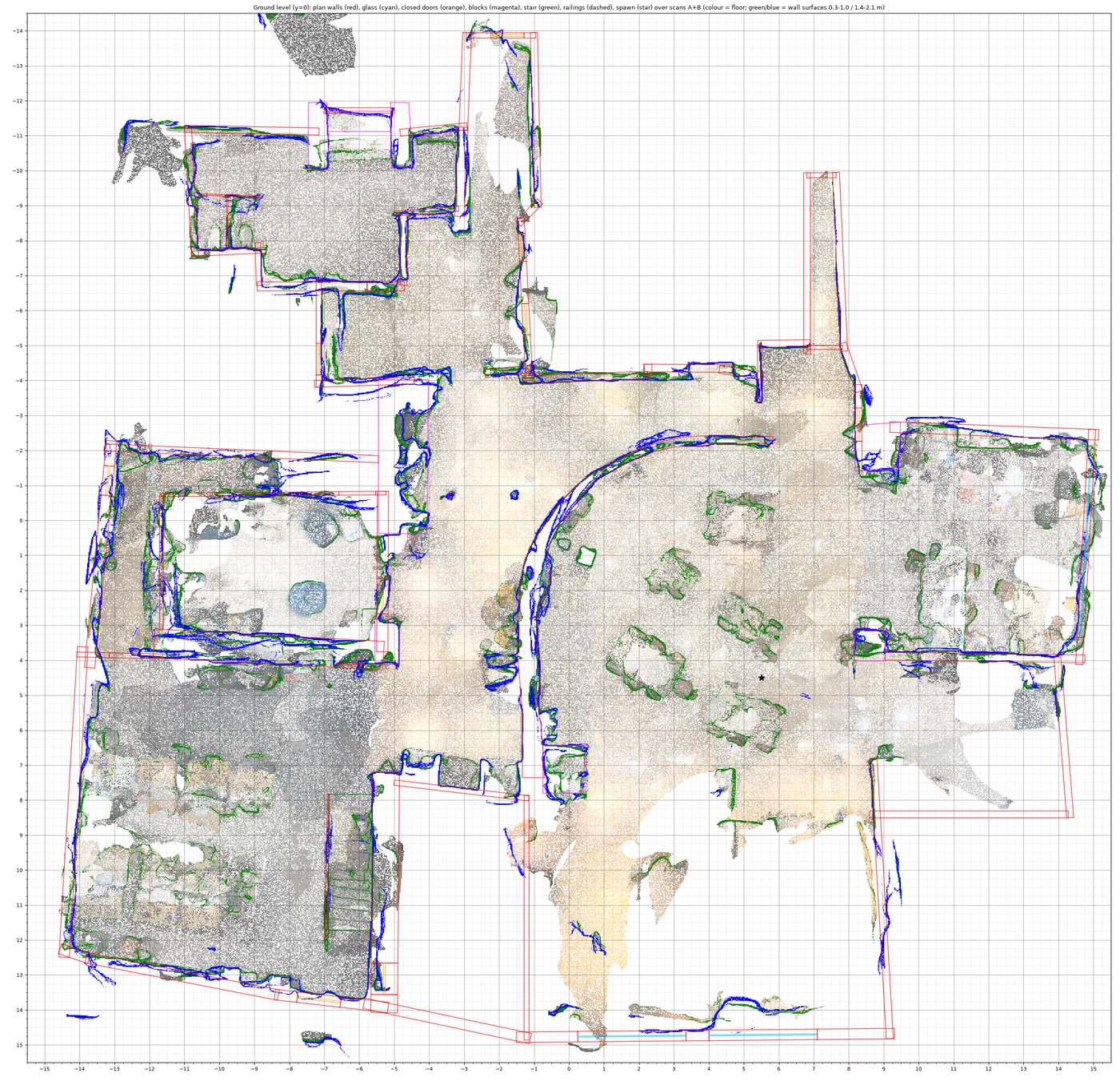
  1. Top-down plot of the ground floor: the colored LiDAR point cloud with the traced floor plan drawn over it in red, blue and green outlines.
    1

    Step 1: Trace the plan over the scan

    Agents traced the floor plan over the scan's point cloud, seen here from above, and stored it as data: 88 walls, 22 openings, a mezzanine at 2.51 meters and a 15-step stair.

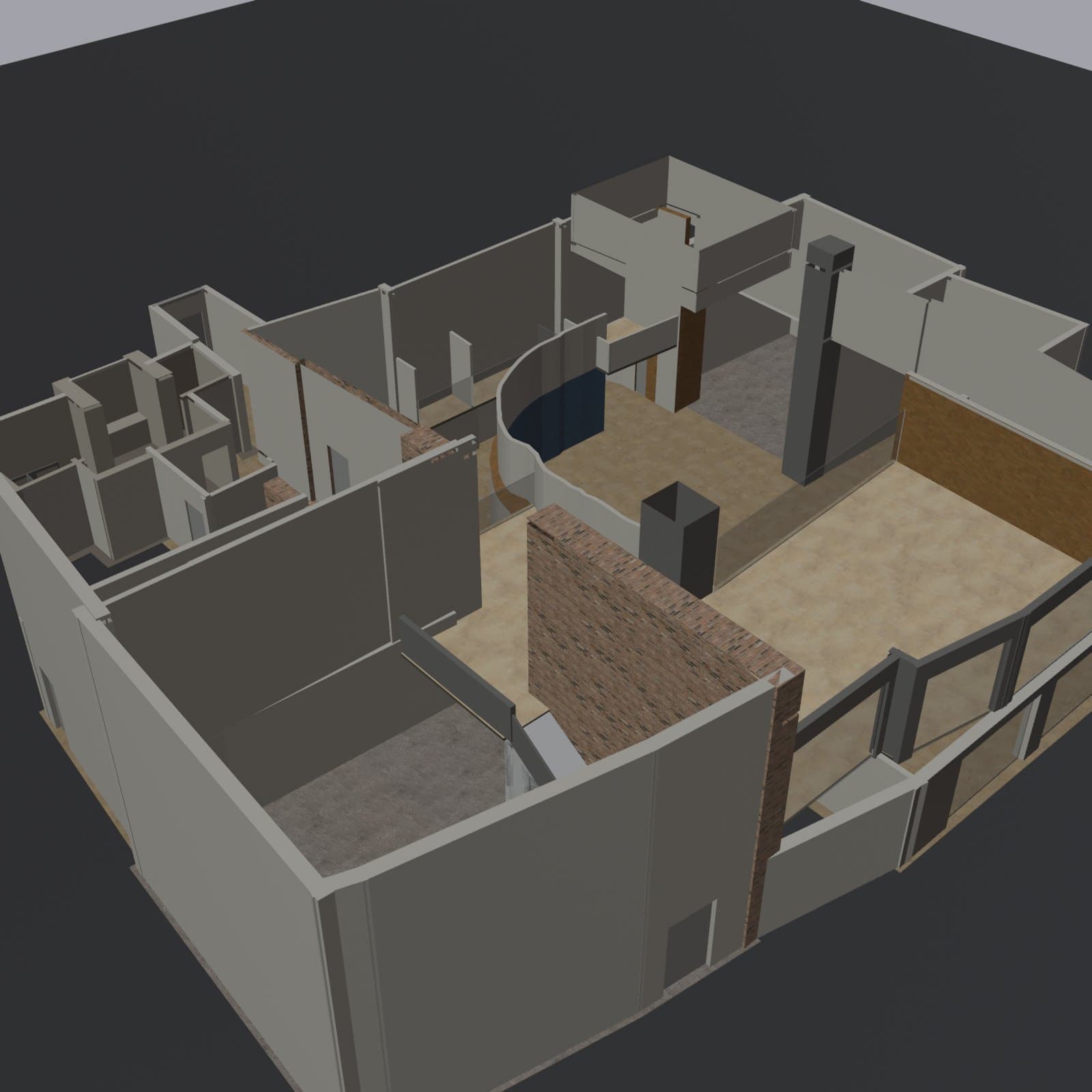
  2. Angled overhead render of the rebuilt school shell: gray walls, a curved wall, a brick wall, rooms and a stair.
    2

    Step 2: Build a clean shell

    Blender, the open-source 3D tool, runs headless and turns the plan into walls, floors, ceilings and built-in fixtures. Then the scans' photo colors are baked onto the clean surfaces, and person-shaped ghosts left in the scans are removed by eye, because face and body detectors miss them.

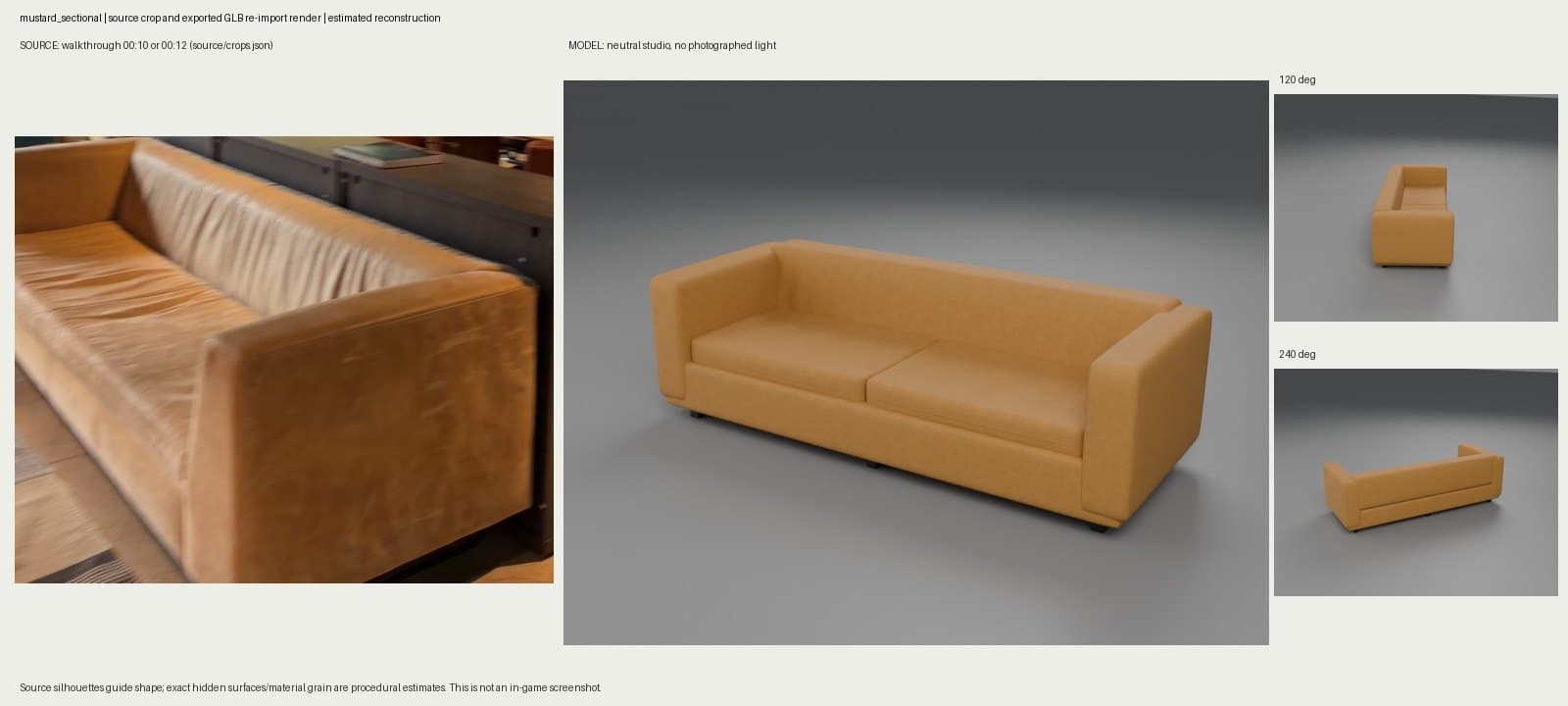
  3. Side-by-side check: a video frame of the real mustard leather sofa, the rebuilt 3D sofa in a gray studio, and two smaller rotated views.
    3

    Step 3: Rebuild every object

    The furniture is inventoried, not guessed: each object has a size, color and position taken from the scans, and procedural Blender models rebuild each variant. Every model is checked against a frame from a walkthrough video of the real building, like this mustard sofa from the downstairs lounge.

Top-down plot of the ground floor: the colored LiDAR point cloud with the traced floor plan drawn over it in red, blue and green outlines.
Angled overhead render of the rebuilt school shell: gray walls, a curved wall, a brick wall, rooms and a stair.
Side-by-side check: a video frame of the real mustard leather sofa, the rebuilt 3D sofa in a gray studio, and two smaller rotated views.

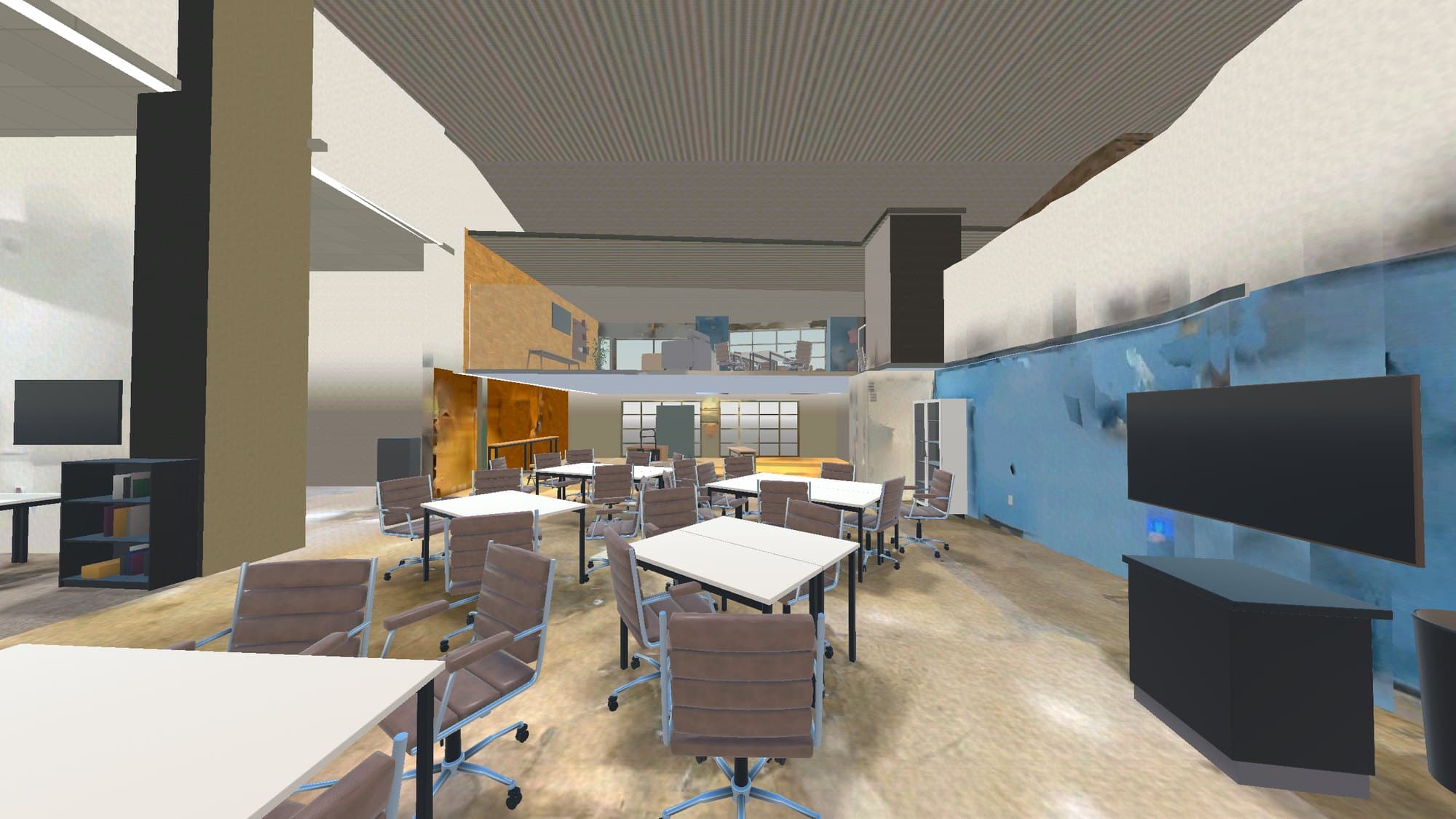
The first walkable version ran in Godot

The first pass went into Godot, a free game engine, and opened in a browser straight into the building at 120 frames per second. WASD moved, the mouse looked, and the number keys jumped between viewpoints around the school. A layout file places 183 objects, so the same building can be set up for a normal day or for an exam. It proved the layout, chairs, TV wall and mezzanine included, but the light and materials still looked like a game.

First-person view inside the earlier Godot build: rows of white tables and leather chairs, a blue wall with a TV, and the mezzanine overhead.
The earlier Godot build, walkable in a browser.

Checks keep the agents honest

With agents doing the modeling, the risk is work that looks finished and isn't. So the build is tested like software: it passes 338 automated checks, including whether you can climb the stairs and a 13-stop walkthrough of the whole building. Production also has quality gates. One room has to pass its own visual and technical checks before the method scales to the rest of the building, and when an approach stops improving after repeated attempts, the agents have to change the method instead of lowering the bar.

Then I moved it to Unreal

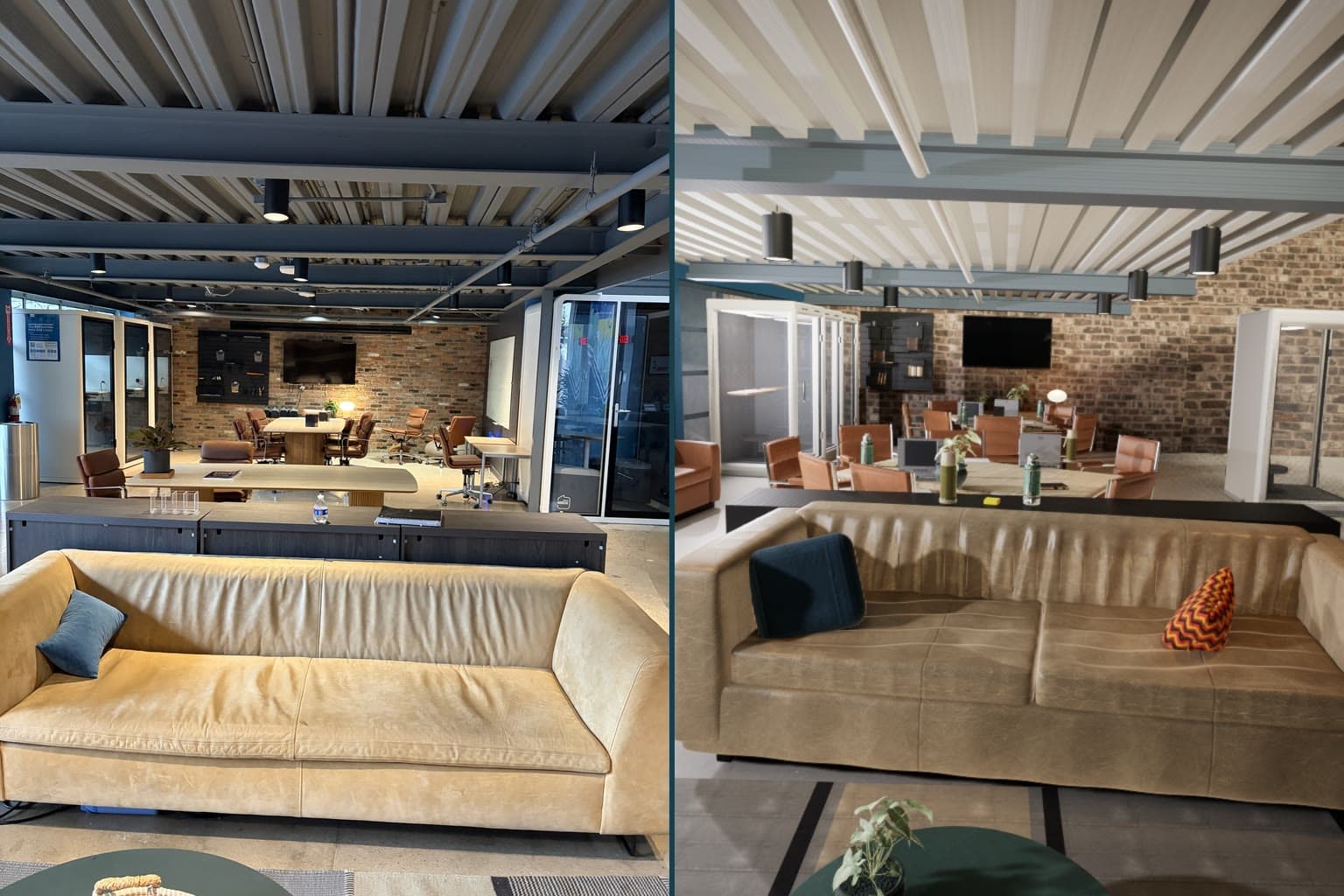
For photoreal light and materials, production moved to Unreal Engine with the same Blender assets and the same gates. Every Unreal camera sits where a real photo was taken, so each render can be checked against the room it copies, down to how bright it is. Once this first room passes, the rest of the building follows it.

Side by side: a photo of the school's downstairs lounge with a tan leather sofa, and the Unreal render of the same view from the same camera position.
Left, a photo of the lounge. Right, the Unreal render from the same spot.

More screens

The meeting area, photo and Unreal render.

1 of 2
Side by side: a photo of the meeting area with leather chairs around a long table by a brick wall, and the Unreal render of the same view.

The meeting area, photo and Unreal render.

1 of 2

More builds

  • AI agentsCrew and JevSep–Oct 2026
  • WebApex SATSep–Oct 2026

Back to the workshop