Cruce Saunders
  • Player card
  • Workshop
  • List
  • Contact

Crawft

May 2026–nowAustin

Tip: Crawft was called Vantage until August 2026. I screened about 1,200 names to replace it.

Cruce SaundersLevel 7
  • Player card
  • Workshop
  • List
  • Contact
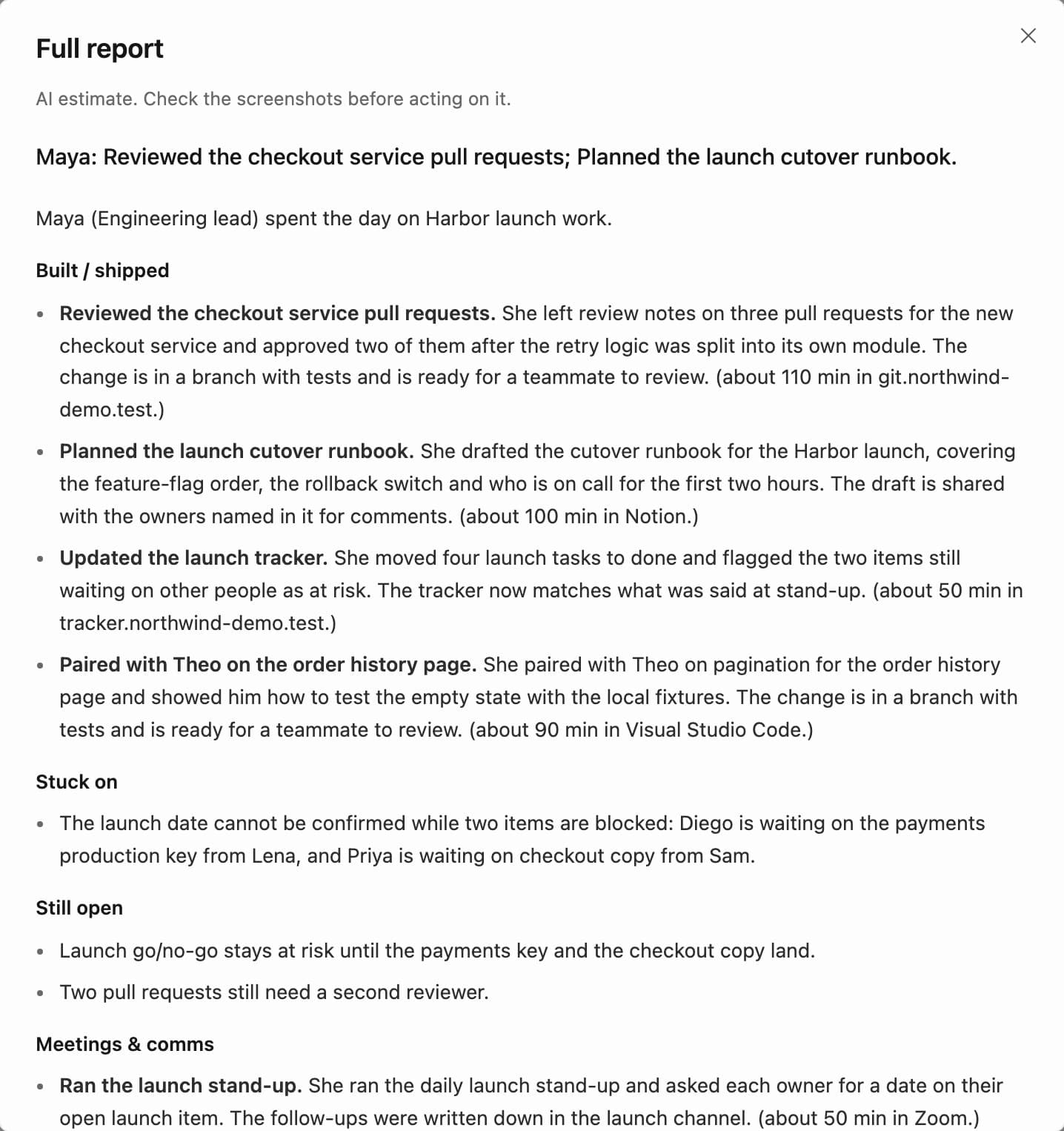
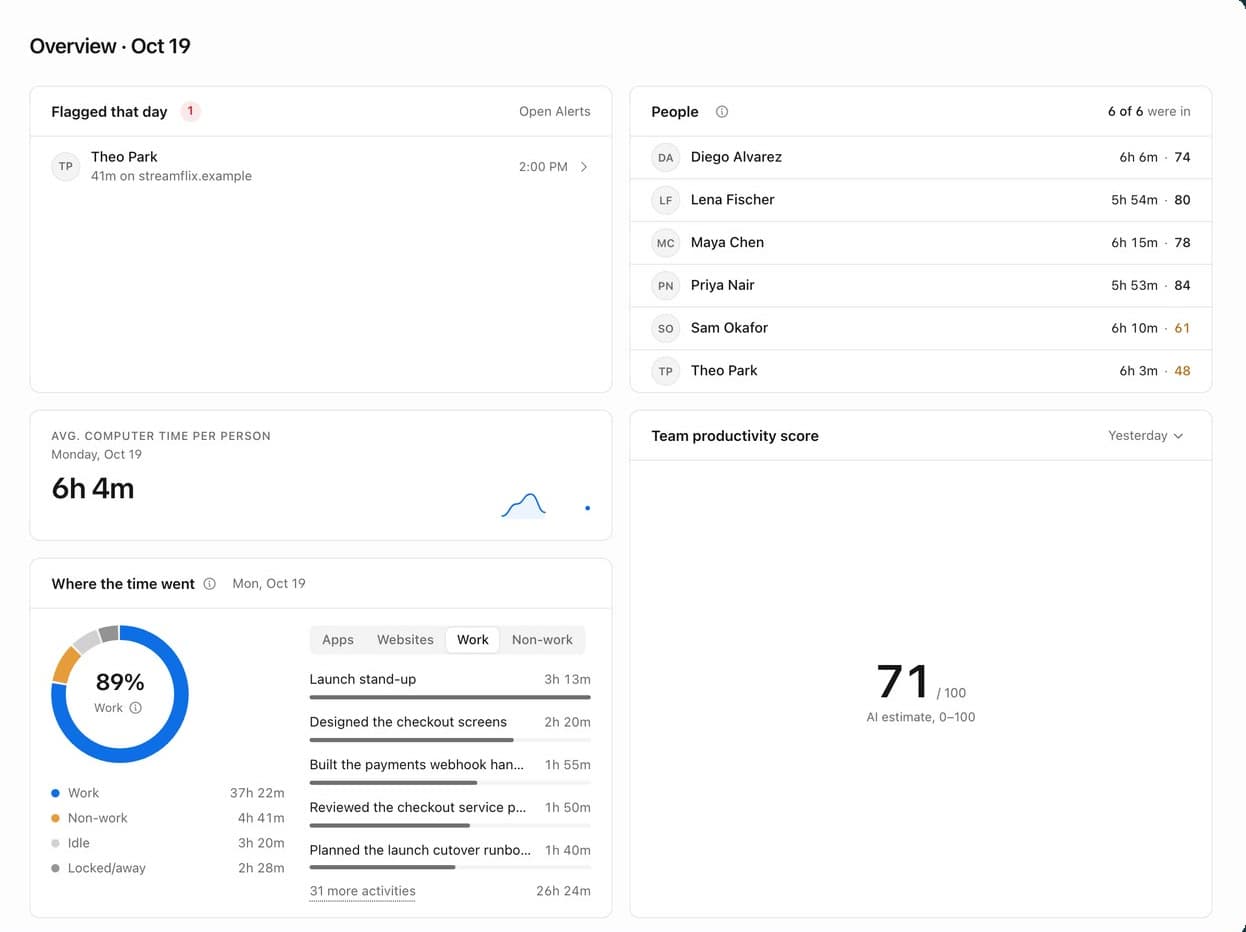
Crawft's team overview for a fictional demo company: one flagged item, six people with their computer time and scores, a donut of where the team's time went, and a team productivity score of 71.

Crawft

Founder & CEO

May 2026–nowAustin

Back to the worldCrawft
  • Player card
  • Workshop
  • List
  • Contact
  • Back to the world
  • Player card
  • Workshop
  • List
  • Contact

Crawft

Crawft is Mac software that shows companies what their team actually works on.

I founded it and built the entire product by directing AI agents.

It's in beta on Macs at Alpha, and I turned down an offer that valued it at $400,000.

commits since May 2026
4,5904,590
automated tests
4,700+4,700+
per seat, per month
$50$50

Managers pay for work they can't see

Picture a 30-person agency that bills its clients by the hour. The manager signs every invoice but can't see the work behind it. What happened today comes from status meetings, timesheets filled in from memory and whoever speaks up, so problems surface late, after the hours are already billed.

Crawft closes that gap. A small app on each company-owned Mac records the workday, and each day the manager can read what every person actually did, in plain English, with the screenshots behind it. Our line for it is simple: see the work you're paying for.
How a workday becomes a report

Crawft works in four stages. On the Mac, a small agent notes which app and window are in front, reads the text on screen, counts keyboard and mouse activity and takes screenshots. It never records what's typed into password fields. It processes and uploads that in small batches every few seconds.

On the server, the raw facts are stitched into a timeline for each person, with the noise removed and the time added up. Then an AI model reads the timeline, hour by hour, and writes the day as activities, projects and outcomes, with every line pointing back to the moments it came from. The manager reads the result in one dashboard.

From a Mac to a manager's report

On each MacServerAI modelManagerEvery line traces backNothing in a report stands without the moments it came from.CaptureProcessed on the Mac and sent in small batches. Neverwhat's typed into password fields.The app and window in frontText read off the screenKeyboard and mouse activityScreenshotsTimeline of factsEach person's day, minute byminute, noise removed and timeadded upAI daily reportReads the timeline hour by hourand writes the day as activities,projects and outcomesManager dashboardThe team, each person's day and anassistant that answers questionseveryfewsecondseveryhoureverydayEach line points to the moments it came fromClick any hour to see itsscreenshotsOn each MacServerAI modelManagerEvery line traces backNothing in a report stands without the moments itcame from.CaptureProcessed on the Mac and sent in smallbatches. Never what's typed into passwordfields.The app and window in frontText read off the screenKeyboard and mouse activityScreenshotsTimeline of factsEach person's day, minute by minute, noiseremoved and time added upAI daily reportReads the timeline hour by hour and writes theday as activities, projects and outcomesManager dashboardThe team, each person's day and an assistantthat answers questionsevery few secondsevery hourevery dayEach line points to the moments it came fromClick any hour to see its screenshots
Every line of a report links back to the screenshots it came from.Request pathEvery line traces back
  • Capture: Processed on the Mac and sent in small batches. Never what's typed into password fields.. The app and window in front; Text read off the screen; Keyboard and mouse activity; Screenshots
  • Timeline of facts: Each person's day, minute by minute, noise removed and time added up
  • AI daily report: Reads the timeline hour by hour and writes the day as activities, projects and outcomes
  • Manager dashboard: The team, each person's day and an assistant that answers questions
  • Every line traces back: Nothing in a report stands without the moments it came from.
  • Every line traces back at AI daily report: Each line points to the moments it came from
  • Every line traces back at Manager dashboard: Click any hour to see its screenshots
  • Capture to Timeline of facts: every few seconds
  • Timeline of facts to AI daily report: every hour
  • AI daily report to Manager dashboard: every day

What a manager sees

This is a manager's day in Crawft, shown with a fictional demo company. Each company also chooses whether to turn on three extras: alerts that flag off-task stretches by naming what was on screen, a live view of a person's screen, and an AI productivity score for the day.

A manager's day in 40 seconds, with demo data.
  1. Crawft's team overview for a demo company: one flagged item, six people with their computer time and scores, average computer time of 6 hours 4 minutes, and a donut showing 89% of the team's time went to work.
    1

    Step 1: Start with the whole team

    The overview shows who was in, each person's computer time, where the team's hours went across work, non-work and idle, the activities that took the most time, and anything flagged that day.

    Shown with demo data.

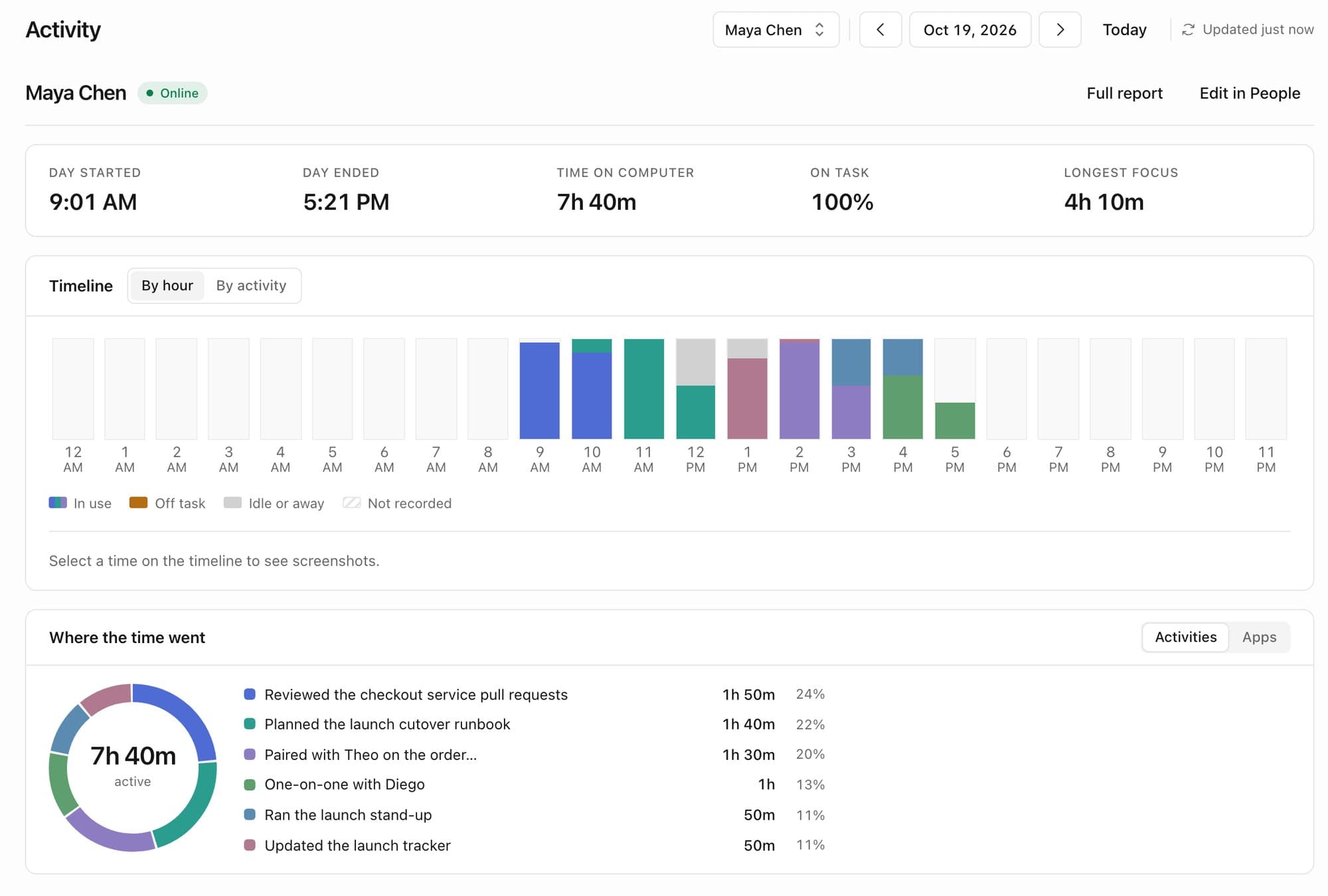
  2. One demo employee's day in Crawft: when it started and ended, 7 hours 40 minutes on the computer, 100% on task, a longest focus of 4 hours 10 minutes, an hour-by-hour timeline colored by activity, and a donut of where the time went, led by reviewing pull requests.
    2

    Step 2: Open anyone's day

    One click opens a person's day: when it started and ended, their time on the computer, how much of it was on task and their longest stretch of focus. A timeline colors each hour by what they were working on, or regroups the day by activity, and clicking any hour pulls up its screenshots. Below it, a donut shows where the time went, activity by activity.

    Shown with demo data.

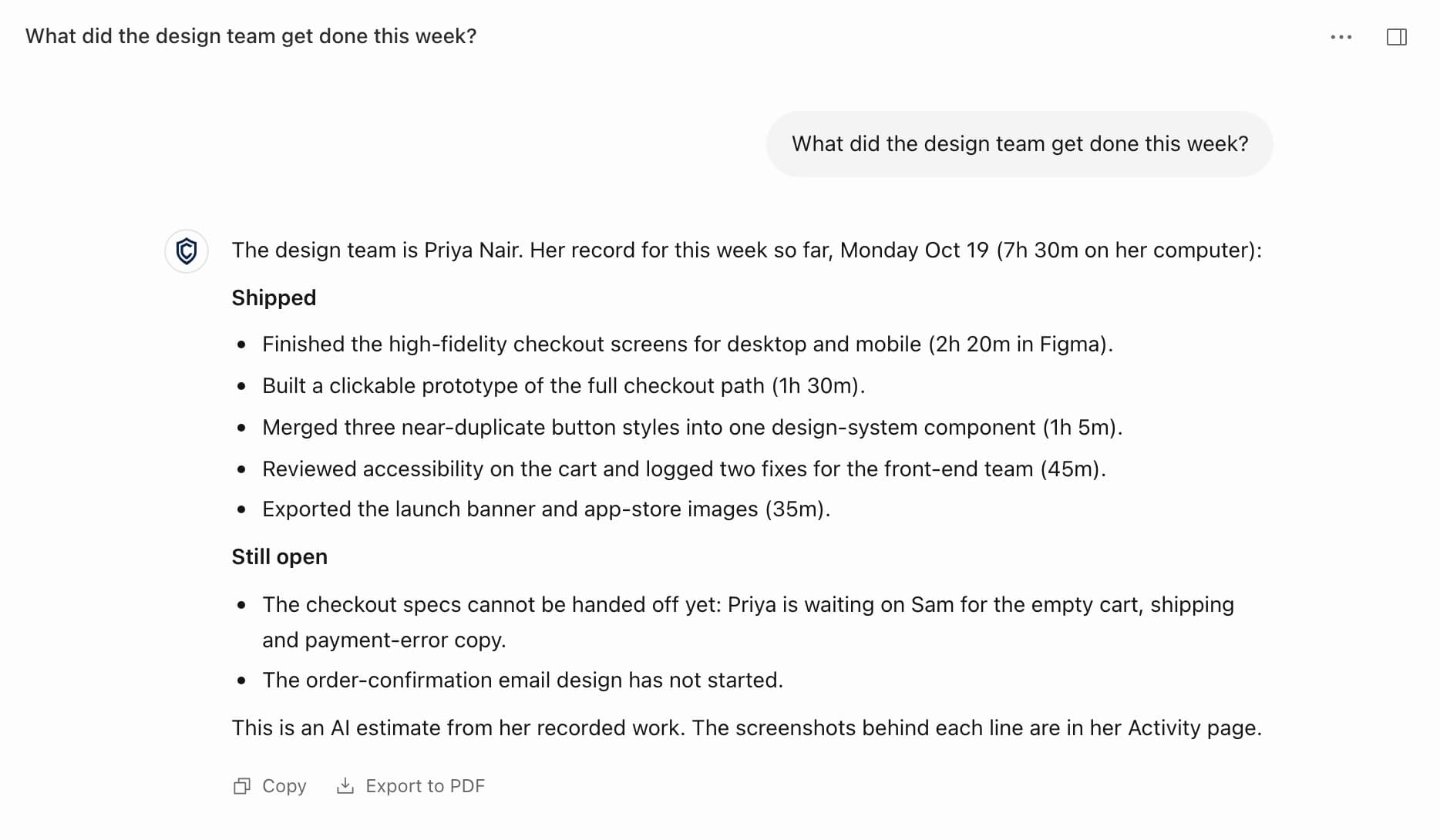
  3. Crawft's full daily report for a demo employee: what she built and shipped, what she was stuck on, what is still open and her meetings, with the minutes spent and the tool used for each piece of work.
    3

    Step 3: Read the full report

    Full report opens the AI's write-up of the day: what they built and shipped, what they're stuck on, what's still open and the meetings they ran, with the minutes and the tool behind each piece of work.

    Shown with demo data.

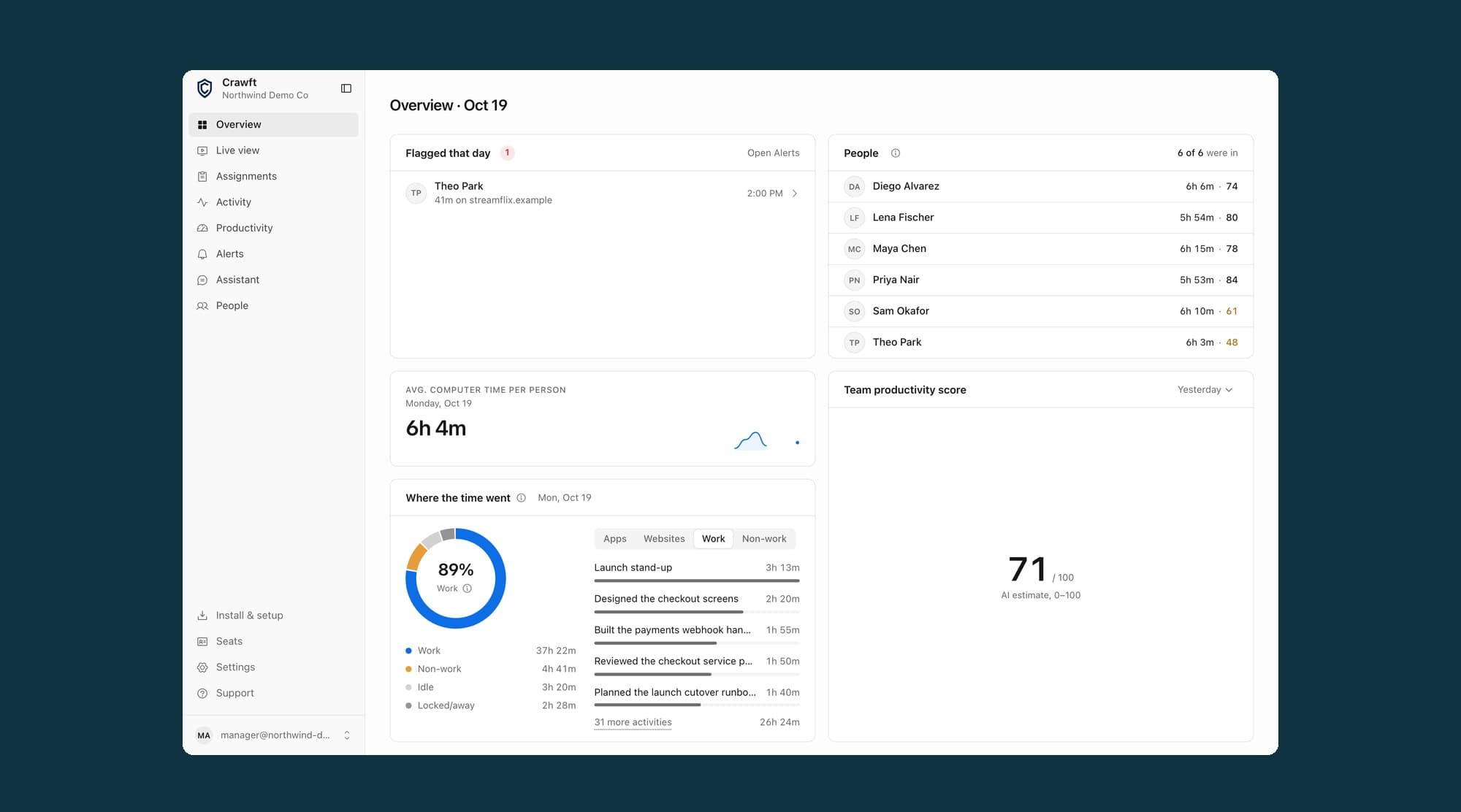
  4. Crawft's Assistant answering “What did the design team get done this week?” with a list of what one demo designer shipped and what is still open, plus Copy and Export to PDF buttons.
    4

    Step 4: Ask anything in plain English

    The Assistant answers questions about the team's work, like what the design team got done this week, from the recorded work and screenshots behind it. It can answer with tables and charts, and one click exports an answer as a PDF report.

    Shown with demo data.

Crawft's team overview for a demo company: one flagged item, six people with their computer time and scores, average computer time of 6 hours 4 minutes, and a donut showing 89% of the team's time went to work.

Shown with demo data.

One demo employee's day in Crawft: when it started and ended, 7 hours 40 minutes on the computer, 100% on task, a longest focus of 4 hours 10 minutes, an hour-by-hour timeline colored by activity, and a donut of where the time went, led by reviewing pull requests.

Shown with demo data.

Crawft's full daily report for a demo employee: what she built and shipped, what she was stuck on, what is still open and her meetings, with the minutes spent and the tool used for each piece of work.

Shown with demo data.

Crawft's Assistant answering “What did the design team get done this week?” with a list of what one demo designer shipped and what is still open, plus Copy and Export to PDF buttons.

Shown with demo data.

It's in beta, and companies are asking

Crawft is in beta on Macs at Alpha, my school, and on my own Macs. I sell it to agencies and studios that bill by the hour, with 8 to 60 people on Macs, and my sales primer teaches a rep to spot a good fit in the first call.

The first conversations came quickly. I demoed Crawft to Bill Perkins, one of the investors from the Hawaii show. My roommate from Wharton's summer program introduced me to his family's company group in Brazil, which asked about testing it with its employees, and in September I presented it to their team over a video call.

I turned down $20,000 for 5%

John Alznauer, my first boss and the founder of the film-marketing startup where I ran sales, offered $20,000 for 5% of Crawft. That offer valued the company at $400,000. I passed, because it wasn't “representative of how much my company was actually worth.” I kept the equity and went back to building.

It started as a tracker for myself

Crawft began as a tool for me. For two years I'd been asking what actually changes how people use their screens: first in my London research, then in LimitlessMinutes, then in TaskGo!, a Mac task app I built whose early Activity tab charted my keyboard and mouse use. By May 2026 I was tracking my own habits with a homemade setup on my Mac. On the evening of May 21 I called it “janky” and asked an AI for something “more sophisticated, more comprehensive, and more robust.” Within about an hour I had two specs. Two days later the first version was running.

I built every layer by directing AI agents

I own the product and every architecture decision, and I log each one in a numbered decision record that now runs past 560 entries. AI agents write the code from my specs and test it the way a customer would use it. Together we shipped a native Mac app, a production backend on AWS, the manager dashboards, and a console for setting up companies and their computers.

When I wanted a Windows version, a lead agent split the work into nine milestones, worker agents built each one, and separate reviewer agents approved or rejected every piece. It shipped as a private beta in September. The system behind that work is on the Workshop page.

Visit crawft.ai

Led to

  • Level 8Wharton + NestIQJul 2026
  • Level 10The WorkshopOct 2025–now

Back to the world